
Download SouzacNFe – Free, Secure Windows App for PDF & Document Management
SouzacNFe is a powerful, free software application designed for Windows users who need efficient file management, particularly for handling NFe (Nota Fiscal Eletrônica) documents. Developed by Souzac, this tool simplifies the organization, viewing, and processing of electronic invoices in Brazil’s digital tax system. With a clean interface and robust functionality, SouzacNFe is ideal for small businesses, accountants, and professionals managing large volumes of fiscal documentation.
The software supports Windows 11 and above, ensuring compatibility with modern systems. While currently available only in Portuguese, its intuitive design makes it accessible even to non-native speakers. As a full version app, SouzacNFe offers all features without time limits or hidden costs.
It’s a reliable, secure, and lightweight solution for managing electronic invoices, with no need for complex setups or cloud subscriptions. Whether you're a freelancer or a growing enterprise, this tool streamlines your document workflow and enhances compliance with Brazilian tax regulations.
Key Features of SouzacNFe – Powerful Document Management Tool
SouzacNFe stands out in the crowded field of file management tools by offering a specialized focus on NFe documents, making it a must-have for Brazilian businesses and professionals. One of its standout features is its ability to open, view, and validate electronic invoices directly within the application, eliminating the need for multiple tools or third-party viewers. The software supports various NFe file formats, including XML and PDF, ensuring seamless access to fiscal documents regardless of how they were generated. Users can also search and filter documents by date, CNPJ, value, or status, which dramatically improves efficiency when managing hundreds of invoices.
Another major advantage is its built-in validation engine, which checks the integrity and authenticity of each NFe file against official Brazilian tax authority standards. This helps prevent errors during submission and ensures compliance with government requirements. The tool also allows users to export and organize files into custom folders, making archiving and audits straightforward. For those who frequently share documents, SouzacNFe offers a one-click export feature to popular formats like PDF or CSV, perfect for integration with accounting software.
Security is a top priority. All files are processed locally, meaning your sensitive fiscal data never leaves your device. This local processing enhances privacy and reduces the risk of data breaches.
The software also includes a recent files history and quick-access dashboard to help users jump back into their work without navigating complex menus. With no ads, no in-app purchases, and a completely free license, SouzacNFe delivers premium functionality without compromise. Whether you're managing daily transactions or preparing for tax season, this app is built to handle the demands of real-world document workflows.
How to Install and Use SouzacNFe on Windows – Step-by-Step Guide
Installing SouzacNFe on your Windows PC is a quick and hassle-free process. First, visit the official Softonic page or the developer’s website to download the latest version, currently v4.1. Since the software is free, you’ll only need to click the download button and wait for the installer file to complete. The file is typically small in size, ensuring fast downloads even on slower connections. Once downloaded, locate the .exe file in your Downloads folder and double-click it to launch the installer.
During installation, you’ll be prompted to choose your preferred language—currently, only Portuguese is supported. However, the interface is highly intuitive, with clear icons and tooltips that guide users through each function. The setup wizard will ask where you’d like to install the program; the default location is recommended unless you have specific preferences. After confirming, the installation will proceed automatically, taking less than a minute. Once complete, you’ll see a shortcut on your desktop and in the Start menu.
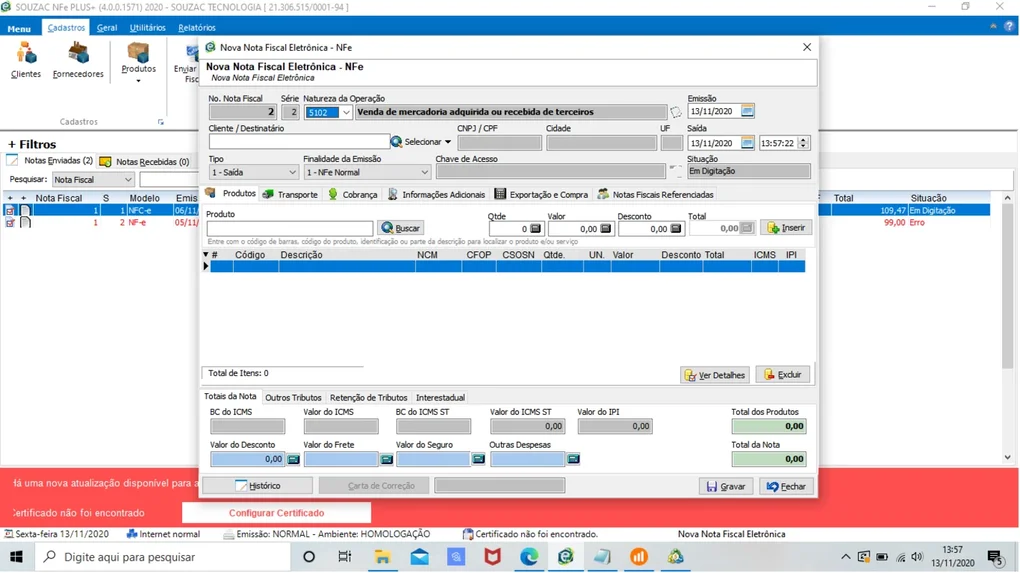
To begin using SouzacNFe, simply open the app. The main window displays a clean dashboard with options to open a file, import multiple documents, or access recent files. To view an NFe, click “Open” and navigate to your document’s location.
The software will load the XML or PDF file instantly, displaying all relevant details such as issuer, recipient, product list, and tax information. You can also drag and drop files directly into the app for faster access. For advanced users, the “Settings” menu allows you to customize default folders, enable automatic validation, and adjust display preferences.
With its user-friendly workflow, even first-time users can become proficient within minutes.
Compatibility & System Requirements – Works on Modern Windows Devices
SouzacNFe is designed with modern computing environments in mind, ensuring optimal performance across a wide range of devices. The software is fully compatible with Windows 11 and Windows 10 (64-bit), and while it may run on older versions, official support begins with Windows 11. This ensures that users benefit from the latest security patches, performance improvements, and UI optimizations provided by Microsoft. The app is lightweight, requiring minimal system resources—typically under 50 MB of RAM during operation—making it suitable for both high-end desktops and older laptops.
Hardware-wise, SouzacNFe does not demand a powerful processor or dedicated graphics card. A standard Intel Core i3 or AMD equivalent is sufficient, and the app runs smoothly on devices with 4 GB of RAM or more. It’s also compatible with both SSD and HDD storage, allowing for fast file access regardless of your drive type. Importantly, the software does not require internet access to function, although a connection is needed for initial updates and validation checks against official government servers.
For users who prefer mobile access, there is currently no Android or iOS version available. However, the desktop focus ensures a stable and secure experience, especially when handling sensitive fiscal data. The app is available exclusively as a Windows installer (.exe), which means it can be deployed across business networks using standard IT management tools. This makes it ideal for small offices or accounting firms that need a consistent, secure solution across multiple machines. With its clear system requirements and reliable performance, SouzacNFe delivers a smooth user experience on any modern Windows device.
Pros and Cons – Honest Review of SouzacNFe
- Pros:
- Completely free to download and use with no hidden fees
- Specialized for NFe documents, ideal for Brazilian businesses
- Local file processing ensures data privacy and security
- Supports XML and PDF formats for maximum compatibility
- Intuitive interface with quick access to recent files and folders
- Automatic validation engine helps prevent submission errors
- Lightweight and fast, even on older systems
- Cons:
- Only available in Portuguese, which may limit international users
- No mobile version for Android or iOS (yet)
- Currently no built-in backup or sync feature
- Limited customization options in the free version
- Update notifications are minimal; users must check manually
Final Verdict: Is SouzacNFe Worth It?
After evaluating its features, usability, and performance, SouzacNFe is a highly recommended tool for anyone in Brazil who deals with electronic invoices regularly. Its specialized focus on NFe documents sets it apart from generic file managers, offering precision and reliability that general tools lack. The fact that it’s free, secure, and runs entirely offline makes it a standout choice for small businesses and independent professionals.
While the lack of a mobile version and language limitations may be drawbacks for some, the core functionality is robust and well-executed. The validation feature alone can save hours of manual checking and reduce the risk of tax penalties. For users who prioritize security and simplicity, SouzacNFe delivers a seamless experience without unnecessary bloat.
If you're looking for a free, secure, and efficient way to manage NFe files on Windows, this app is a top contender. Download it today and experience a smarter way to handle your fiscal documentation.
Download SouzacNFe now and simplify your document workflow!
Frequently Asked Questions (FAQ)
-
Is SouzacNFe free to download and use?
Yes, SouzacNFe is completely free to download and use. There are no trial periods, subscriptions, or hidden costs. The full version is available at no charge.
-
Can I use SouzacNFe on Windows 10?
While the software officially supports Windows 11, many users have reported successful operation on Windows 10 (64-bit). For best results, we recommend using Windows 11.
-
Does SouzacNFe support other file types besides NFe?
The app is primarily designed for NFe documents in XML and PDF formats. While it may open other files, its core features are optimized for fiscal documentation.
-
Is my data safe when using SouzacNFe?
Yes, all processing happens locally on your device. Your files are never uploaded to the cloud or shared with third parties, ensuring maximum privacy and security.
-
How often is SouzacNFe updated?
The latest version is v4.1, released in June 2024. Updates are released periodically to fix bugs and improve validation accuracy. Users are encouraged to check the official site for the latest release.
Yes, SouzacNFe is completely free to download and use. There are no trial periods, subscriptions, or hidden costs. The full version is available at no charge.
While the software officially supports Windows 11, many users have reported successful operation on Windows 10 (64-bit). For best results, we recommend using Windows 11.
The app is primarily designed for NFe documents in XML and PDF formats. While it may open other files, its core features are optimized for fiscal documentation.
Yes, all processing happens locally on your device. Your files are never uploaded to the cloud or shared with third parties, ensuring maximum privacy and security.
The latest version is v4.1, released in June 2024. Updates are released periodically to fix bugs and improve validation accuracy. Users are encouraged to check the official site for the latest release.







